Note
Click here to download the full example code
Load Data by Signia Hearing Aids#
This example shows you how to load data recorded with Signia hearing aids. Please note, that the privat python package signialib is required for running this example. Furthermore, if you want to use the loading functionalities your data needs to be *.mat files with the same data structure as the *.mat files in the example_data folder.
Getting some example data#
For this we take some example data that contains regular walking movements.
data_path is the local path of the directory containing the recorded data.
Note: The directory should any contain a single recoding (maximum two *.mat files, for each ear one)
# from eargait.event_detection import DiaoAdaptedEventDetection
# from eargait.preprocessing import align_gravity_and_convert_ear_to_ebf, convert_ear_to_ebf, load

from pathlib import Path

from eargait.utils.example_data import get_mat_example_data_path, get_txt_example_data_path

# data directory
data_path = get_mat_example_data_path()
data_path
PosixPath('/home/docs/checkouts/readthedocs.org/user_builds/eargait/checkouts/latest/example_data/mat_files/fast')
Loading an individual Dataset#
Note: This method loads a single *.mat file. If the recording constitutes a *.mat file for both ears, it’s not recommended to use this function but to load a Session as shown in the next section.
from signialib import Dataset

dataset = Dataset.from_mat_file(data_path.joinpath("data_left.mat"))
# not recommended, recommended to use Session.from_folder_path(data_path) instead.
Loading the data from mat files#
from signialib import Session

session = Session.from_folder_path(data_path)
Loading the data from txt files#
For txt files a different loading function is required.
The function from_file_path expects a specific file path of either a txt file or a single mat file,
e.g. user/example.txt or user/example.mat.
All other functionalities (alignment, resampling etc., see below) for sessions are the same for all file types.
from signialib import Session

data_path_txt = get_txt_example_data_path()
session_txt = Session.from_file_path(data_path_txt)
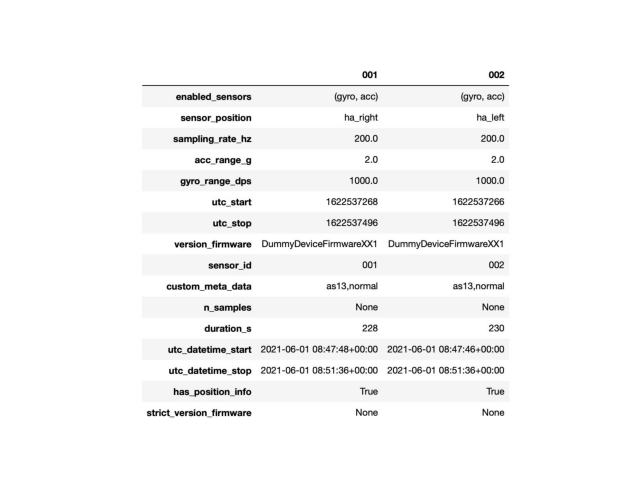
Get information about session#
session.info

# should display something like this:
from eargait.utils.example_data import plot_image

IMAGE = plot_image(data_path.parent.parent.parent.joinpath("docs/_static/example_screenshots/session_info.jpeg"))
Get information about sensors#
Two examples for how to access further information on e.g. sensor_ids or sampling rate
session.info.sensor_id
('001', '002')
session.info.sampling_rate_hz
(200.0, 200.0)
Align and calibrate data#
The two recordings of the left and right ear might slightly defer in the number of samples due to unavoidable
inaccuracies in the sample rate. The alignment corrects these small differences.
For the beginning set skip_calibration=True.
aligned_session = session.align_calib_resample(skip_calibration=True)
Note:
The calibration_files can be skipped using the skip_calibration parameter. However, a calibration_files for IMU sensors to align
sensor axes to the individual sensor case is recommended using the calibration_files method proposed by Ferraris et al. [1].
The imucal package [2] provides a code and a detailed description of the calibration_files.
[1] [Ferraris et al., Calibration of three-axial rate gyros without angular velocity standards, Sensors and Actuators A: Physical, 1994]
[2] [(https://imucal.readthedocs.io)]
Resampling#
resampled_session = session.align_calib_resample(skip_calibration=True, resample_rate_hz=50)
resampled_session.info.sampling_rate_hz
(50.0, 50.0)
Get single dataset#
Either by position (ha_left, ha_right) or by ID
left_dataset = resampled_session.get_dataset_by_position("ha_left")
dataset_1 = resampled_session.get_dataset_by_id("001")
Getting a single datastream#
Either acceleration or gyroscope data. Furthermore, the datastream can be directly extracted as pd.DataFrame
Gravity Alignment and Conversion to medical coordinate system (only for singia hearing aids!!)#
This method can be used to align the data to gravity. The method is only available for Signia hearing aids, because orientation of IMU within world frame is known. For further information on the different coordinate systems please refer to the documentation Coordinate Systems
from eargait.preprocessing import align_gravity_and_convert_ear_to_ebf
from eargait.utils import StaticWindowGravityAlignment, TrimMeanGravityAlignment

gravity_method = StaticWindowGravityAlignment(resampled_session.info.sampling_rate_hz[0])
ear_data = align_gravity_and_convert_ear_to_ebf(session, gravity_method)
Gyroscope signal is used for gravity alignment.
Gyroscope signal is used for gravity alignment.
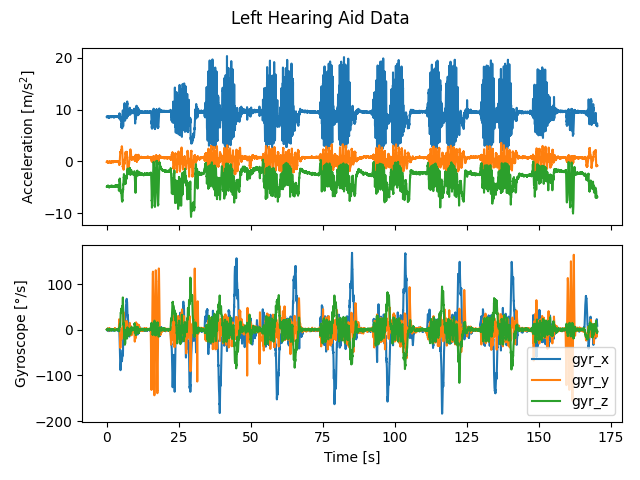
Data visualization#
Small example.
import matplotlib.pyplot as plt

fig, axes = plt.subplots(2, 1, sharex=True)
acc = aligned_session.get_dataset_by_position("ha_left").acc.data_as_df()
axes[0].plot(acc, label=acc.columns)
axes[0].set_ylabel("Acceleration [m/s$^2$]")
gyro = aligned_session.get_dataset_by_position("ha_left").gyro.data_as_df()
axes[1].plot(gyro, label=gyro.columns)
axes[1].set_ylabel("Gyroscope [°/s]")
axes[1].set_xlabel("Time [s]")
plt.suptitle("Left Hearing Aid Data")
plt.legend()
plt.tight_layout()
plt.show()
k = 1
Total running time of the script: ( 0 minutes 6.753 seconds)
Estimated memory usage: 46 MB